Alert Destinations
Alert destinations allow health checks to send notifications when checks fail or encounter errors. Destinations are configured in health check resources and support multiple notification platforms.
Overview
Destinations are used when a HealthCheck or ScheduledHealthCheck has mode: alert. When a check fails or returns an error, the Holmes Operator sends notifications to all configured destinations.
Key Concepts:
- Destinations are defined per-check in the
destinationsfield - Multiple destinations can be configured for a single check
- Global credentials can be set via environment variables (recommended)
- Per-check credentials can override global settings
Supported Destinations
Holmes Operator currently supports two alert destination types:
- Slack - Send formatted messages to Slack channels
- PagerDuty - Create incidents in PagerDuty
Slack Destination
Send rich, formatted notifications to Slack channels when health checks fail.
Prerequisites
- Slack workspace access
- Slack Bot Token (starts with
xoxb-)
Configuration
Option 1: Global Slack Token (Recommended)
Configure the Slack token globally for all checks (On Holmes, not Operator):
# values.yaml
additionalEnvVars:
  - name: SLACK_TOKEN
    value: "xoxb-your-slack-bot-token"
  # Or from a secret (recommended for production):
  # - name: SLACK_TOKEN
  #   valueFrom:
  #     secretKeyRef:
  #       name: holmes-secrets
  #       key: slack-token
With a global token, checks only need to specify the channel:
apiVersion: holmesgpt.dev/v1alpha1
kind: HealthCheck
metadata:
  name: production-check
spec:
  query: "Are all production pods healthy?"
  mode: alert
  destinations:
    - type: slack
      config:
        channel: "#production-alerts"
Option 2: Per-Check Token
Specify the token directly in the check configuration:
apiVersion: holmesgpt.dev/v1alpha1
kind: HealthCheck
metadata:
  name: production-check
spec:
  query: "Are all production pods healthy?"
  mode: alert
  destinations:
    - type: slack
      config:
        token: "xoxb-your-slack-bot-token"  # Not recommended
        channel: "#production-alerts"
Security Best Practice
Always use global environment variables loaded from Kubernetes secrets rather than hardcoding tokens in check resources.
Configuration Fields
channel (string, required)
Slack channel to post messages to. Must include the # prefix.
- Example:
"#alerts","#production-alerts"
token (string, optional)
Slack Bot Token. If not provided, uses the global SLACK_TOKEN environment variable.
- Format:
xoxb-* - Source: Slack App OAuth Token
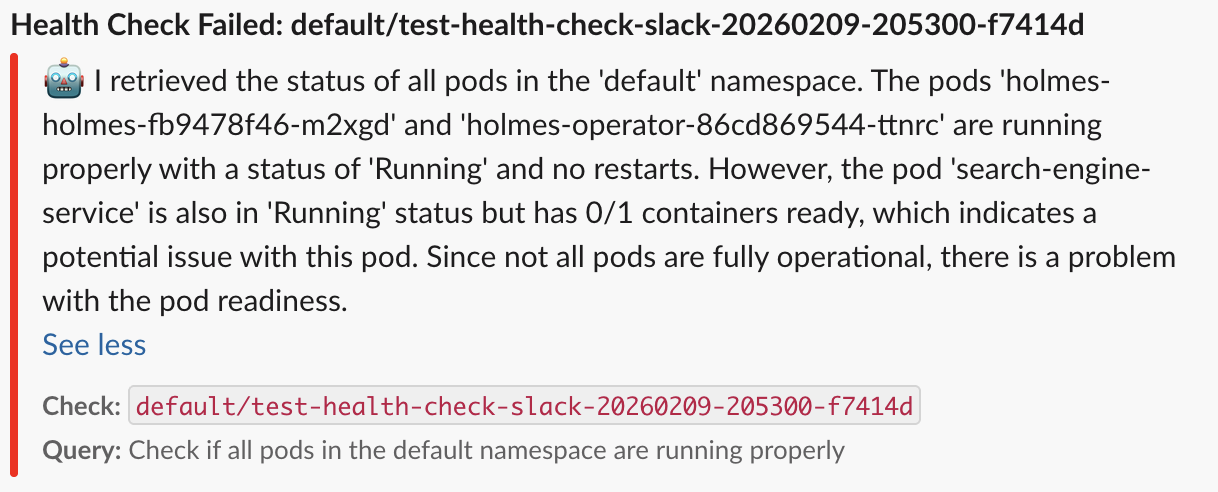
Message Format
Example Slack message:
PagerDuty Destination
Create incidents in PagerDuty when health checks fail, with full context and analysis.
Prerequisites
- PagerDuty account
- PagerDuty Events API v2 Integration Key
- Service configured in PagerDuty
Getting an Integration Key
- In PagerDuty, navigate to Services > Service Directory
- Select your service (or create a new one)
- Go to the Integrations tab
- Click Add Integration
- Select Events API V2
- Copy the Integration Key (starts with routing key format)
Configuration
Option 1: Global Integration Key (Recommended)
Configure globally for all checks:
# values.yaml
additionalEnvVars:
  - name: PAGERDUTY_INTEGRATION_KEY
    value: "your-integration-key"
  # Or from a secret (recommended):
  # - name: PAGERDUTY_INTEGRATION_KEY
  #   valueFrom:
  #     secretKeyRef:
  #       name: holmes-secrets
  #       key: pagerduty-key
Checks can then omit the integration key:
apiVersion: holmesgpt.dev/v1alpha1
kind: HealthCheck
metadata:
  name: critical-service-check
spec:
  query: "Is the payment service healthy and processing transactions?"
  mode: alert
  destinations:
    - type: pagerduty
      config: {}  # Uses global integration key
Option 2: Per-Check Integration Key
Specify the key directly in the check:
apiVersion: holmesgpt.dev/v1alpha1
kind: HealthCheck
metadata:
  name: critical-service-check
spec:
  query: "Is the payment service healthy?"
  mode: alert
  destinations:
    - type: pagerduty
      config:
        integration_key: "your-integration-key"
Configuration Fields
integration_key (string, optional)
PagerDuty Events API v2 integration key for the target service.
- If not provided, uses the global
PAGERDUTY_INTEGRATION_KEYenvironment variable
api_url (string, optional)
PagerDuty Events API endpoint. Rarely needs to be changed.
- Default:
https://events.pagerduty.com/v2/enqueue - Only override for custom PagerDuty instances
Incident Details
PagerDuty incidents created by Holmes include:
Basic Information:
- Summary: Holmes Check Failed: <check-name>
- Severity: error (or critical, warning, info based on check tags)
- Source: holmes
- Component: Check source type
- Group: health-checks
Custom Details:
- holmes_analysis: Full LLM reasoning and determination
- source_type: Where the check ran (e.g., kubernetes)
- check_details: Raw check data and context
- tools_used: List of data sources queried by the AI
Deduplication: - Incidents are deduplicated using check ID - Multiple failures of the same check update the existing incident
Links: - If the check has an associated URL, it's included as a link in the incident
Notification Status
Check notification delivery status:
# View notification status for a check
kubectl get hc <name> -o jsonpath='{.status.notifications}'

# Example output:
# [
#   {
#     "type": "slack",
#     "channel": "#alerts",
#     "status": "sent"
#   },
#   {
#     "type": "pagerduty",
#     "status": "sent"
#   }
# ]
Possible notification statuses:
sent- Notification delivered successfullyfailed- Notification delivery failed (check operator logs)skipped- Notification not sent (e.g., check passed)
Next Steps
- Health Checks - Learn about creating HealthCheck resources
- Scheduled Health Checks - Set up recurring checks with destinations
- Configuration - Advanced operator configuration
- Slack Installation - Detailed Slack setup guide