GitHub Models
Configure HolmesGPT to use GitHub Models.
Setup
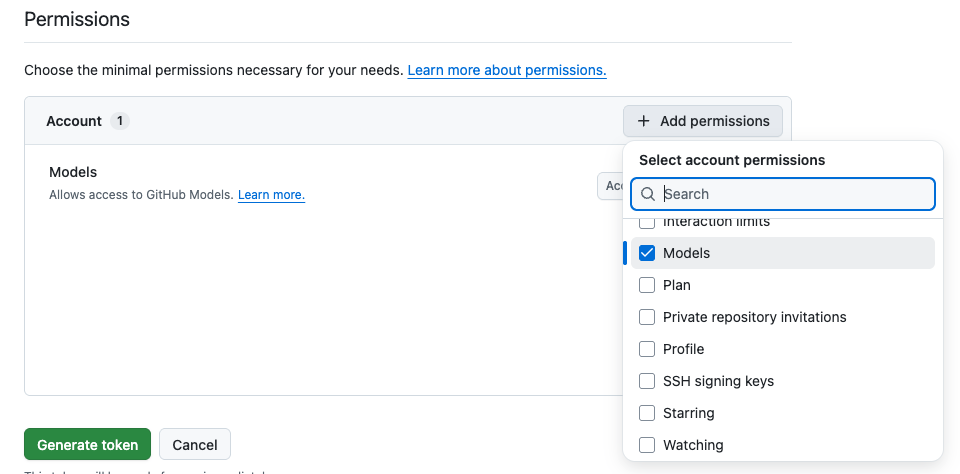
Create a GitHub Personal Access Token (fine-grained) with the Models permission:
Browse the full list of available models at github.com/marketplace/models.
Verify model availability before configuring
Some models are listed in the GitHub Models catalog but are not actually available for your account. Before configuring a model in HolmesGPT, open the model's page in the GitHub Models playground, send it any message (e.g. "hello"), and verify you get a response. If the model doesn't respond, it won't work with HolmesGPT either.
Configuration
Using Environment Variables:
export GITHUB_API_KEY="your-github-token"
holmes ask "what pods are failing?" --model="github/gpt-4.1"
Using Command Line Parameters:
Model Naming
Use github/ prefix followed by the model name, dropping the company prefix. For example, openai/gpt-4.1 in the catalog becomes github/gpt-4.1.
Create Kubernetes Secret:
kubectl create secret generic holmes-secrets \
  --from-literal=github-api-key="your-github-token" \
  -n <namespace>
Configure Helm Values:
Additional Resources
- GitHub Models Catalog - browse all available models
- LiteLLM GitHub provider docs